
Promotion de 5% sur tout le catalogue avec le code : APPS2025 🚀

Valable jusqu’au 24/11/2025 inclus, hors promo déjà appliquées, code promotionnel non cumulable.

SKU: WCAPIDAE
Catégorie : ,

ApidaePress 1.0.0

Version: 1.0.0
Updates available: 1 year

The most flexible connector for displaying Apidae content on your WordPress site. Whether your site is a tourism or culture platform, ApidaePress allows you to display elements from Apidae directly on your WordPress site. Display your tourist objects elegantly in a list or on their dedicated page. Adapt the content to your designs, […]

299,00

The most flexible connector for displaying Apidae content on your WordPress site.

Whether your site is a tourism or culture platform, ApidaePress allows you to display items from Apidae directly on your WordPress site. Display your tourist attractions elegantly in a list or on their dedicated page.

ApidaePress provides numerous building blocks to display information exactly as it appears in your mock-ups. No technical or graphic design skills are required to use ApidaePress.
installez, configurez, affichez : c’est tout !

Grant access to your content

List of items, multi-criteria search form, interactive map: you have everything at your fingertips.
ApidaePress offers three layouts for content results: list, grid, and featured. The content of items can be fully customised from the native WordPress page editor.

Overview of possibilities
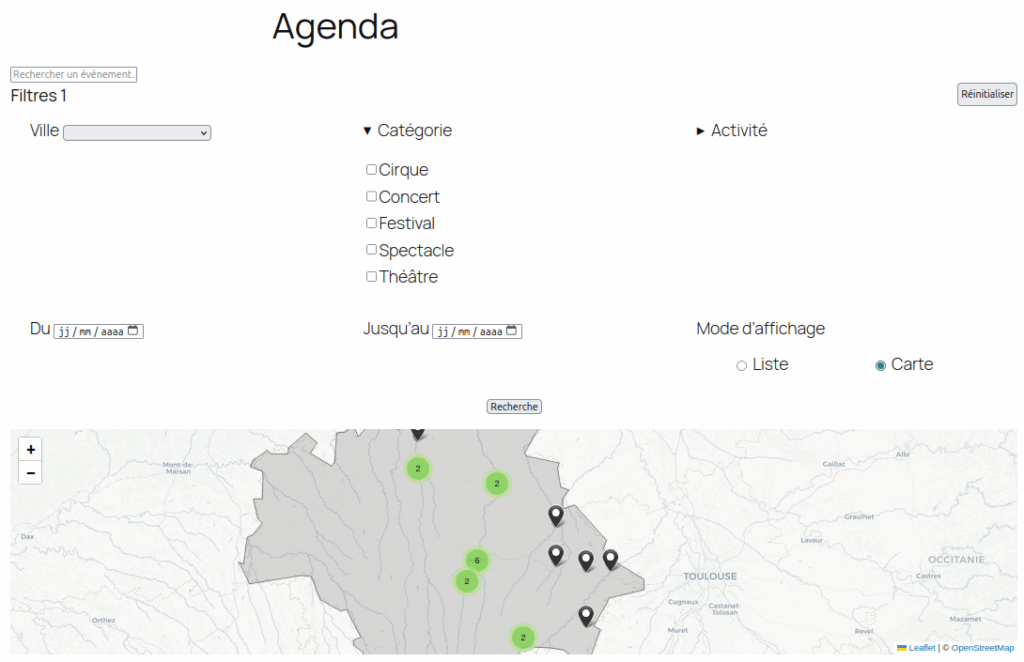
Advanced search and map display


Elegant list


Customised layout


Would you like more information?

 

Name
ApidaePress
Last activity
1 month
Created
7 months

apidaepress-1.0.0.zip

Size
5 MB
File

You have not purchased this product yet.

Add to cart

Releases:

1.0.0

Initial release

ApidaePress

This plugin allows you to show and search from your Wordpress data from your RIC database

Installation

  1. Upload the plugin files to the /wp-content/plugins/ directory, or install the plugin through the WordPress plugins screen directly.
  2. Activate the plugin through the ‘Plugins’ screen in WordPress
  3. Go to the Apidae » Settings to fill up API Credentials

Installation, configuration et utilisation

Découvrez comment configurer et commencer à utiliser ApidaePress en quelques minutes.

Read documentation

Vos question à propose de Apidaepress

Les cas d'usages et question fréquentes.

View FAQ

On the same topics...