
 EN
EN  FR
FR 

Discover how to hide categories and products for Woocommerce
Take full control of your Woocommerce
With Hide categories and products for Woocommerce
instantly access features to hide products from a category or any category in your store.
Free plugins
Get an essential plugin that's completely free.
Compatibility
The plugin is compatible with shortcodes and the StoreFront theme.
Easy
Quick and easy installation and use to simplify your life.
Tip: Hide your products or categories
in 3 clicks
Access your product settings on Woocommerce
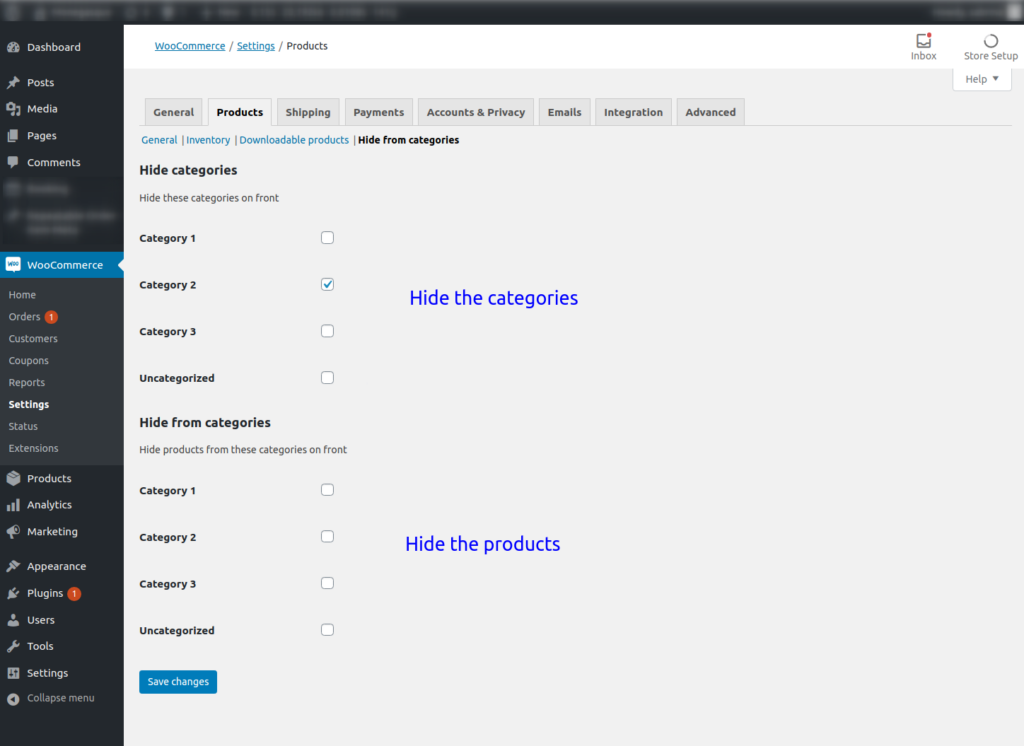
Go to the “Hide categories” subsection.
Select the product category or product you want to hide.
It's done!
Would you like to know more ?
Come to view product sheet !

Our articles about the plugin
-

What’s new in Hide Categories and Products for WooCommerce v1.3.0
Manage directly from the category list Toggle the visibility of categories and/or their products directly from the list. The icon shows at a glance which product categories are visible in your shop. Manage from the page…
-

Discover PersonaLizer: one website, multiple experiences
What does PersonaLizer offer? Why use PersonaLizer? Try the extension for free here > Free vs Pro: what are the differences? Summary: The free version allows you to personalise your content by assigning personas to your visitors so that they…
-
Discover how to hide categories and products for Woocommerce
Tip: Hide your products or categories in just 3 clicks. That’s it! Want to find out more? Take a look at the product page! Our articles about the extension