
 EN
EN  FR
FR 
Create a layout with Elegant WPC Product Bundles
Go to Products > Add.
In the product data, select « Smart batch ».
Access the « Elegant WPC Product Bundles » submenu.
Modernise the display of the WPC Product Bundles plugin by adding various options.
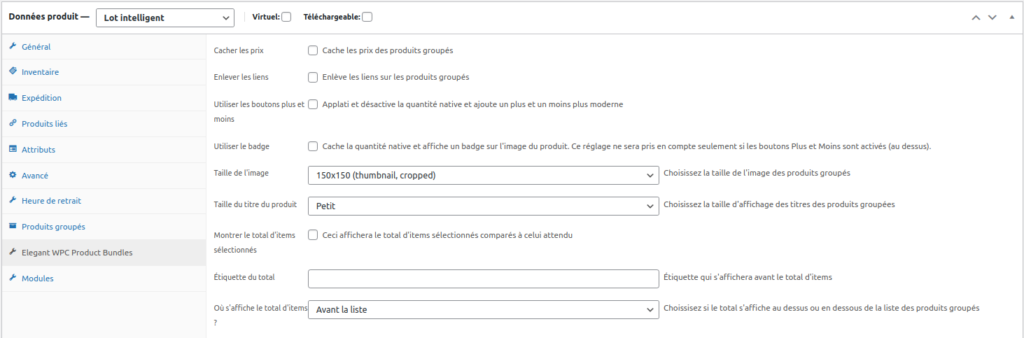
From the « Elegant WPC Product Bundles » menu, you have the option to hide the prices of bundled products.
« Remove links » allows you to remove links to products in cases where certain products visible in the batch are not available for sale outside of the batch.
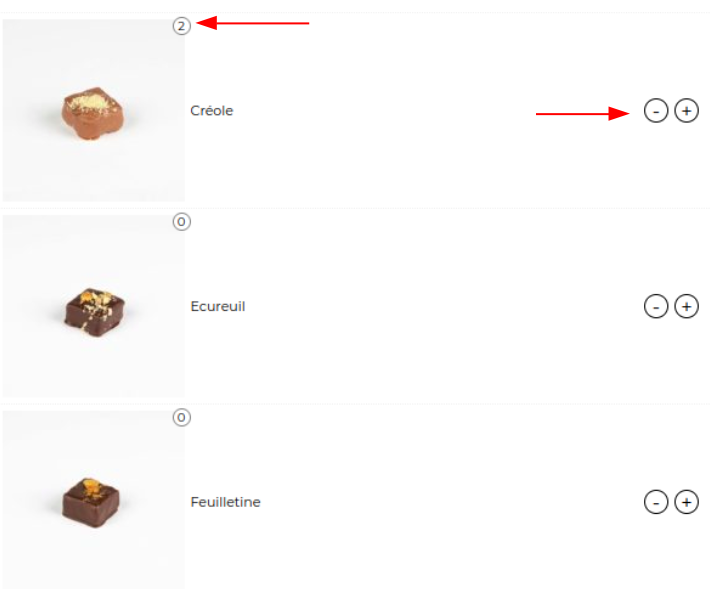
« Use buttons » and « Use badge » replace WPC's native selection and display with « – » and « + » selection buttons and a quantity badge for a more modern look.
You can also set the size of the product thumbnails and their titles.

« Show total items selected » will display an indicator of the quantity of products already added to the batch.

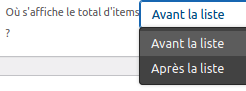
You can choose to display this indicator above or below the batch using « Where is the total number of items displayed? »
Would you like to know more ?
Come to view product sheet !

Discover our tutorials

Discover how to hide categories and products for Woocommerce
Voir la fiche produit Prenez le plein contrôle de votre Woocommerce Avec Masquer les catégories et produits pour Woocommerceaccédez en un instant…

Generate your tax receipts on WooCommerce and CiviCRM
Voir la fiche produit Lire la documentation Notre extension va vous permettre d’éditer rapidement et simplement vos reçus fiscaux de l’année ! C’est…
Create a layout with Elegant WPC Product Bundles
Voir la fiche produit 1Accéder à Produits > Ajouter. 2Dans les données du produits sélectionner « Lot intelligent ». 3Accéder au sous-menu « Elegant WPC Product…

Comment exporter vos commandes WooCommerce vers EBP Comptabilité avec « Comptabilité
Do you have a WooCommerce online store and want to export your completed orders to your accounting software? Here’s how to do it!

How to use Gutenberg for WordPress?
Pour faciliter votre utilisation de WordPress, nous vous avons réalisé un top 5 des meilleurs tutoriels du net ! Attention, certaines…