
 EN
EN  FR
FR 
Create a layout with Elegant WPC Product Bundles
Go to Products > Add.
In the product data, select « Smart batch ».
Access the « Elegant WPC Product Bundles » submenu.
Modernise the display of the WPC Product Bundles plugin by adding various options.
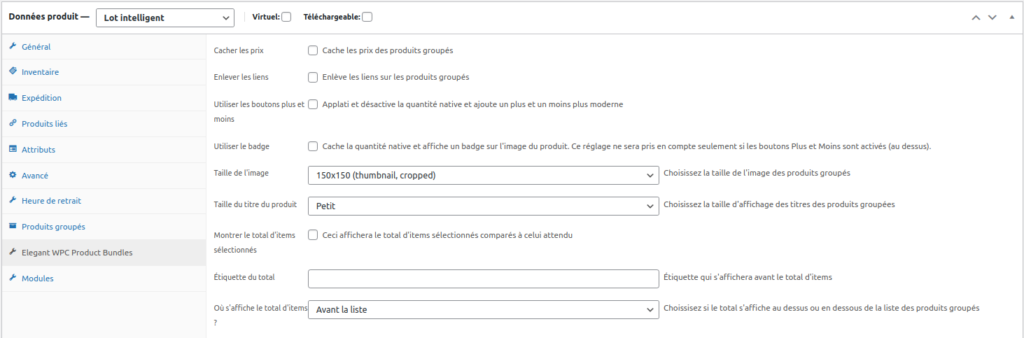
From the « Elegant WPC Product Bundles » menu, you have the option to hide the prices of bundled products.
« Remove links » allows you to remove links to products in cases where certain products visible in the batch are not available for sale outside of the batch.
« Use buttons » and « Use badge » replace WPC's native selection and display with « – » and « + » selection buttons and a quantity badge for a more modern look.
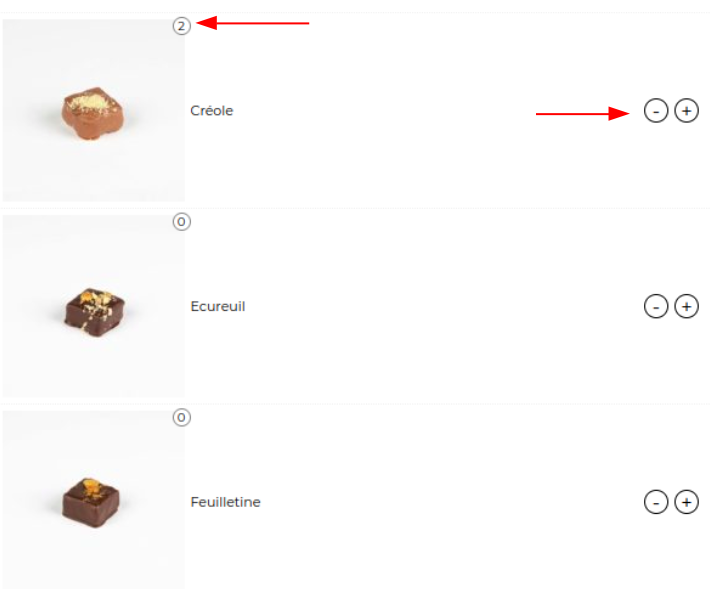
You can also set the size of the product thumbnails and their titles.

« Show total items selected » will display an indicator of the quantity of products already added to the batch.

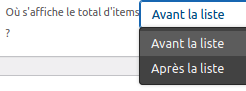
You can choose to display this indicator above or below the batch using « Where is the total number of items displayed? »
Would you like to know more ?
Come to view product sheet !

Discover our tutorials

WE are ready for WordPress 7.0
Wednesday 20 May 2026 is the announced release date for the new major version of WordPress 7.0 and all our plugins…

Discover how to hide categories and products for Woocommerce
Take full control of your WooCommerce With ‘Hide Categories and Products for WooCommerce’, you can instantly access…

Generate your tax receipts on WooCommerce and CiviCRM
Our add-on will allow you to quickly and easily edit your tax receipts for the year! It’s…
Create a layout with Elegant WPC Product Bundles
1.Go to Products > Add. 2.In the product details, select ‘Smart Batch’. 3.Go to the ‘Elegant WPC Product…’ sub-menu

How to export your WooCommerce orders to EBP Accounting using ‘Accounting’
Do you have a WooCommerce online store and want to export your completed orders to your accounting software? Here’s how to do it!